![WhatsApp Catalog: How To Sell Products on WhatsApp [A Complete Guide]](https://panel.gokwik.co/storage/app/public/images/use_kwikengage_for_a_seamless_whatsapp_catalog_setup__1772512572.jpg)
Indian eCommerce is a competitive and high speed industry. The distance between ‘I like this’ and ‘I bought this’ needs to be as short as possible. Traditional websites often force shoppers through too many clicks and page loads, causing them to drop off before reaching the checkout.
A WhatsApp Catalog changes that by bringing your store to where your customers already hang out. It functions as a 24/7 digital storefront, allowing shoppers to browse your collections, check prices, and "Add to Cart" without ever leaving the chat. By removing these extra steps, you create a frictionless shopping experience designed for mobile users.
This guide will show you how to set up your catalog and use WhatsApp automation tools like Kwik Engage to turn everyday conversations into a reliable revenue stream.
What is a WhatsApp Business Catalog?
Before looking into the key aspects of the setup, it’s crucial to first understand the tool. A WhatsApp Business Catalog acts as a digital extension of your e-commerce store, allowing you to display products directly within the app. It eliminates the need to send customers to external sites for basic browsing, keeping the shopping journey contained within the chat.
Beyond the catalog, there are several other WhatsApp business features designed to help brands manage customer interactions more efficiently.
- Mobile Storefront: It replaces bulky price list pdfs and scattered product photos with a professional, visual interface. This provides a seamless browsing experience that keeps customers engaged and reduces the chances of them dropping off.
- Detailed Listings: You can upload up to 10 high-resolution images per item, along with prices, descriptions, and direct checkout links. This ensures that every product card contains all the information a buyer needs to make a decision.
- Easy Sharing: Your team can send specific items or your entire product range to customers in just two taps. This transforms simple inquiries into professional sales opportunities instantly.
- WhatsApp Catalog Categories: Group your inventory into "Collections" such as New Arrivals or Best Sellers. This allows customers to navigate your shop by interest, much like they would on your main website.
Why Do You Need a WhatsApp Catalog?
If you are still sending individual product photos and manually typing prices, you are wasting time and missing sales. Here is why the WhatsApp catalog feature is a game-changer for Indian brands scaling their operations and looking for efficiency.
Understanding these tools is essential as WhatsApp commerce in India continues to redefine how D2C brands interact with their mobile-first customer base.
- Reduces Friction: Customers don't have to switch between apps to see what you offer. Keeping the entire shopping experience inside WhatsApp significantly lowers the bounce rate compared to directing traffic to external links.
- Builds Trust: A professional-looking catalog makes your brand look established and reliable. Seeing a well-organized WhatsApp Business Catalog example gives customers confidence that you are a serious business entity they can trust.
- Saves Support Time: Instead of answering ‘Do you have this in blue?’ or ‘What is the price?’, customers can find the info themselves. This frees up your support team to handle more complex queries.
- Boosts Discovery: Once your WhatsApp Catalog has more than 20 items, a search button appears to help customers find exactly what they want instantly. This improves the overall user experience and drives more views.
How to Create a WhatsApp Business Catalog (Step-by-Step)
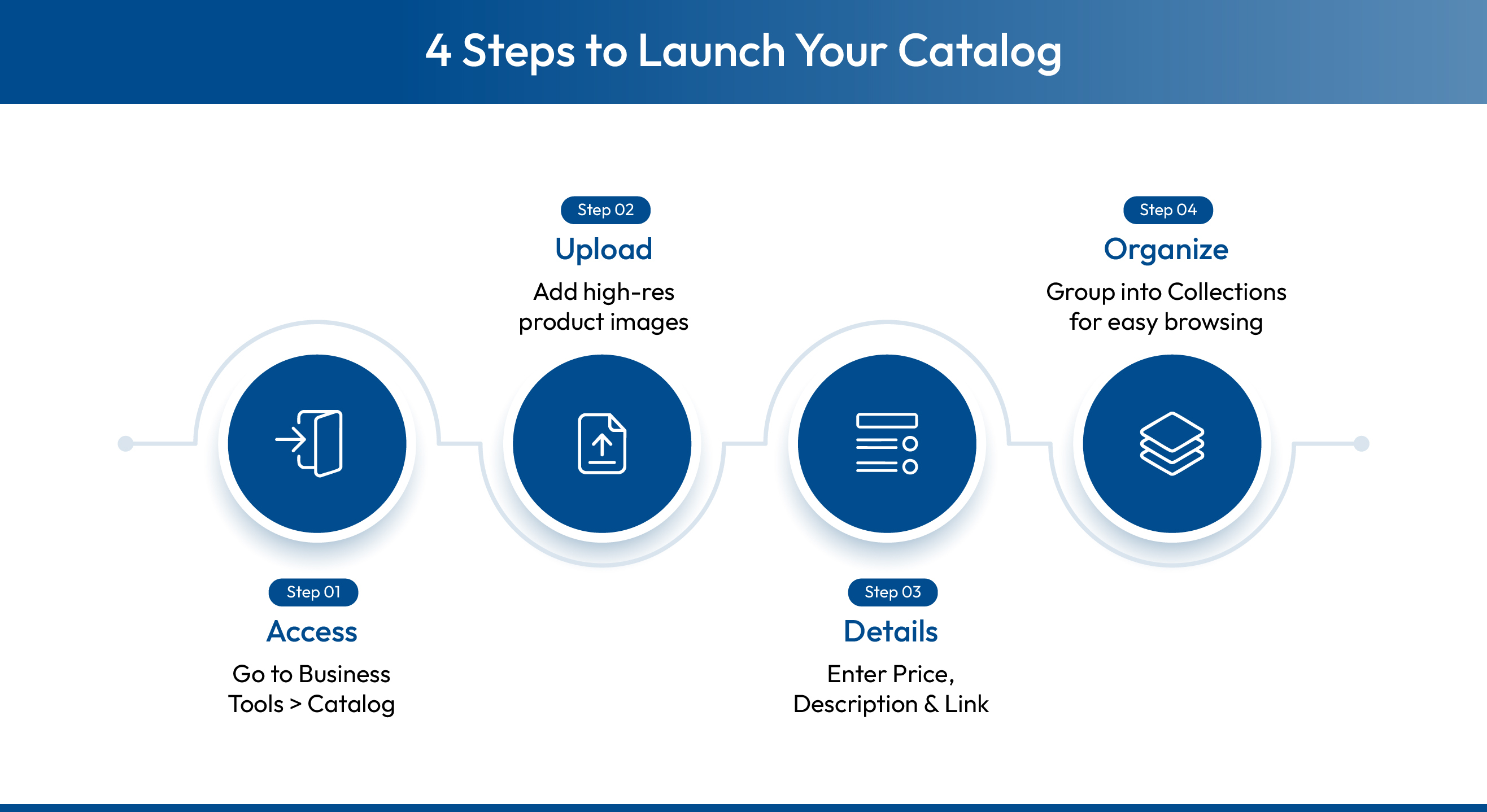
Setting up your shopfront is simple and can be done directly from your phone. Here are WhatsApp Business Catalogue guidelines to help you get started with your first listing in minutes without any technical expertise required.
Open your WhatsApp Business App. On Android, tap the three dots at the top right corner and go to Business Tools, then select Catalog. On iOS, head to Settings, then Business Tools, and tap Catalog. This is your central dashboard for all product listings.
If you prefer managing your operations from a desktop, follow our WhatsApp Business Web guide to sync your storefront across devices.
Tap Add New Item to begin uploading.
A strong WhatsApp Business Catalog example would show product images, a benefit-led description, and a direct checkout link all in one listing.
Tap on ‘More Fields’ to add a website link (perfect for redirecting to your checkout page) and a SKU code for your internal inventory tracking. This connects your WhatsApp Catalog store to your wider e-commerce operations for seamless management.
Don't just dump products in a list. Create Collections (Sets) to group items logically, such as ‘New Arrivals,’ ‘Summer Collection’ or ‘Clearance Sale.’ This helps customers navigate your WhatsApp Catalog intuitively and find the specific categories they are interested in buying.
Tips for Developing a High-Converting WhatsApp Business Catalog
For an e-commerce brand, your WhatsApp catalog acts as a high-intent landing page. If it looks unprofessional or outdated, you aren't just losing a sale; you're losing customer trust. Use these practical steps to optimize your digital storefront for better performance.
High-quality catalogs are just one part of the puzzle; you can also implement these 10 WhatsApp automation tricks to further boost engagement for your brand.

Why Manual WhatsApp Catalogs Fail at Scale?
While these optimizations help, they do not solve the operational hurdles faced by scaling D2C brands. The standard WhatsApp Business app is built for small, manual operations, but it quickly becomes a bottleneck as your order volume grows.
Transitioning to WhatsApp automation is the most effective way to eliminate these manual bottlenecks and ensure your store stays updated.
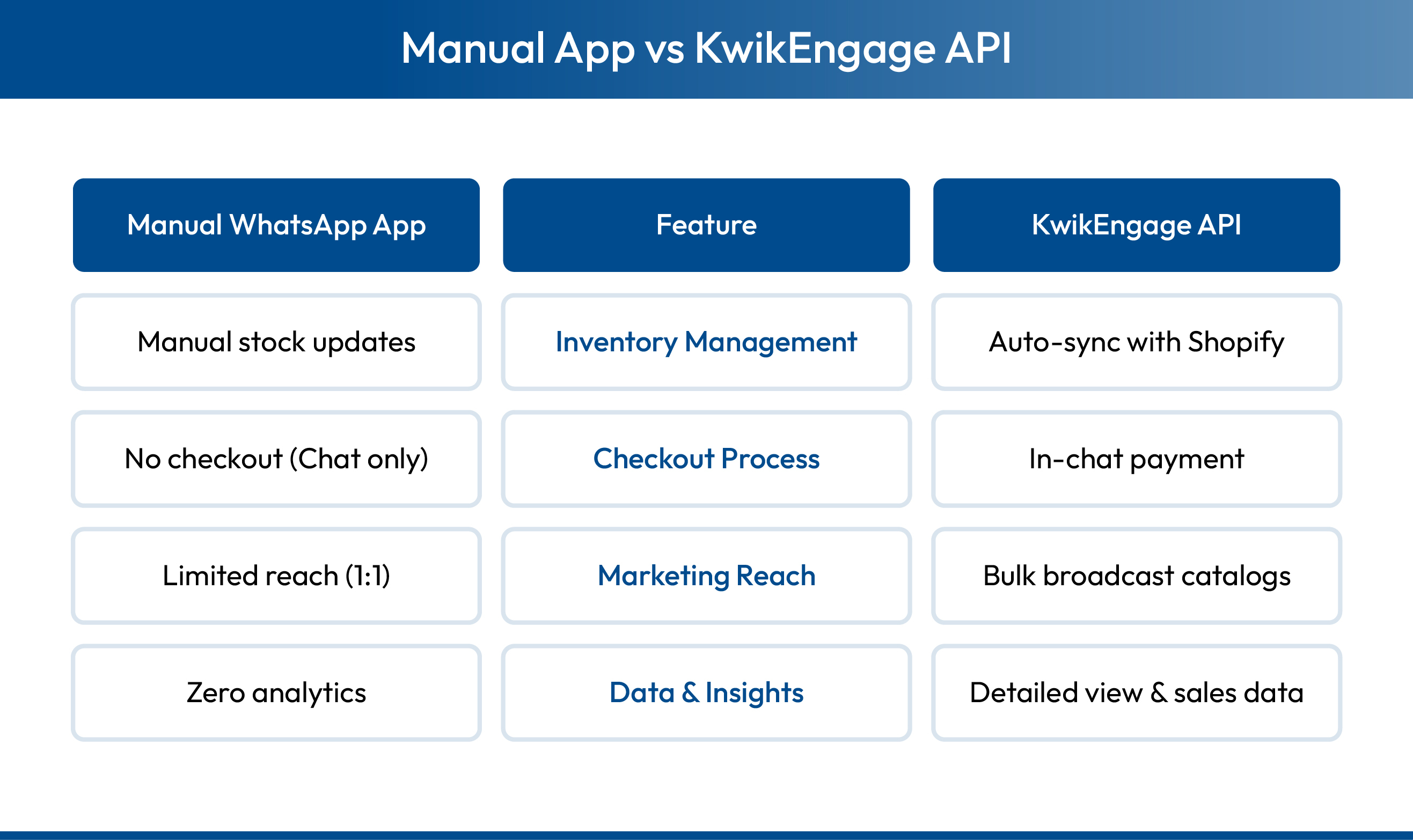
- The Inventory Sync Gap: Manually updating stock levels is a recipe for disaster. If you sell out on Shopify but forget to update your WhatsApp Catalog, you end up with angry customers and wasted support time.
- Friction in the Checkout: In the standard app, a catalog is merely a menu. Customers still have to message you to place an order, leading to long negotiation chats that increase drop-offs and delay the final sale.
- Limited Marketing Reach: You cannot broadcast your catalog to thousands of customers automatically using the basic app. This limitation prevents you from scaling your marketing campaigns effectively during high-traffic peak sale seasons.
Scaling Your Sales with Kwik Engage & WhatsApp Business API
While the basic app is great for small shops, scaling brands need more power. If you are handling hundreds of orders, manual catalog sharing becomes impossible. This is where Kwik Engage transforms your WhatsApp Catalog into a revenue engine.
H2: Final Takeaway: Stop Chatting, Start Selling
WhatsApp Catalog acts as the bridge between a conversation and a conversion. By organizing your products effectively and using a tool like Kwik Engage to automate the journey, you turn your WhatsApp account into your most profitable sales channel.
Stop treating WhatsApp like a simple support line. With the right catalog strategy and API integration, it becomes a 24/7 automated salesperson that showcases your products, answers queries and collects payments while you sleep.
Book a demo today to see how it can transform your WhatsApp marketing campaign.