The festive season sees a peak in shopping. With most brands offering heavy discounts and competitive deals, customers find themselves busy on multiple eCommerce websites. Data-driven marketing can be a game-changer for brands during the festive season. And, Facebook is a key platform for festive advertisements for brands to use. However, with soaring customer acquisition costs during festive seasons, you want to ensure your Facebook advertising and marketing strategy is cost-effective and brings high ROI. That’s where events firing on Facebook come in!
In this blog, we explore effective ways to leverage Facebook during the festive season through events firing.
What Is Events Firing On Facebook?
Event firing refers to the process of tracking customer activities on your eCommerce website and sending the data back to Facebook through Facebook Pixel or Conversions API.
For instance, track activities such as page views, add to cart, purchases, and other interactions. This information can then be used by Facebook to measure and optimize Facebook ad performance. Therefore, events-firing on Facebook is important during the high-sales period around the festive season.
- Events firing on Facebook enhances customer insights - By tracking customer activity on the website, brands can gain deeper insights into customers, their behaviour patterns, interests, likes, spending capacity, and demographic details, among other information. This data helps understand customers at a deeper level and helps create more informed and targeted marketing strategies.
- eCommerce marketers can make data-driven decisions - By monitoring and measuring customer activity, brands can make data-driven decisions rather than depend on guesswork. Information about customer activity gathered from the website can be forwarded to other channels, such as Facebook, to create more targeted ads and recommendations based on data.
What Are The Benefits Of Events Firing?
Here are some benefits of events firing on Facebook:
During the festive season, customers end up browsing multiple sites simultaneously. Hence, if you fail to retain their attention and let them slip, they may not return to your site again. This is where event firing on Facebook comes into the picture. It provides real-time data on customer activity. This data can be utilized to craft personalized and relevant campaigns to target customers on Facebook.
For instance, say customers have added products to their cart but did not make purchases. You can use this data, and send it to Facebook to convert it into marketing campaigns. For example, Facebook can offer discounts on those products or simply retarget that customer segment. Tailored campaigns have
Source
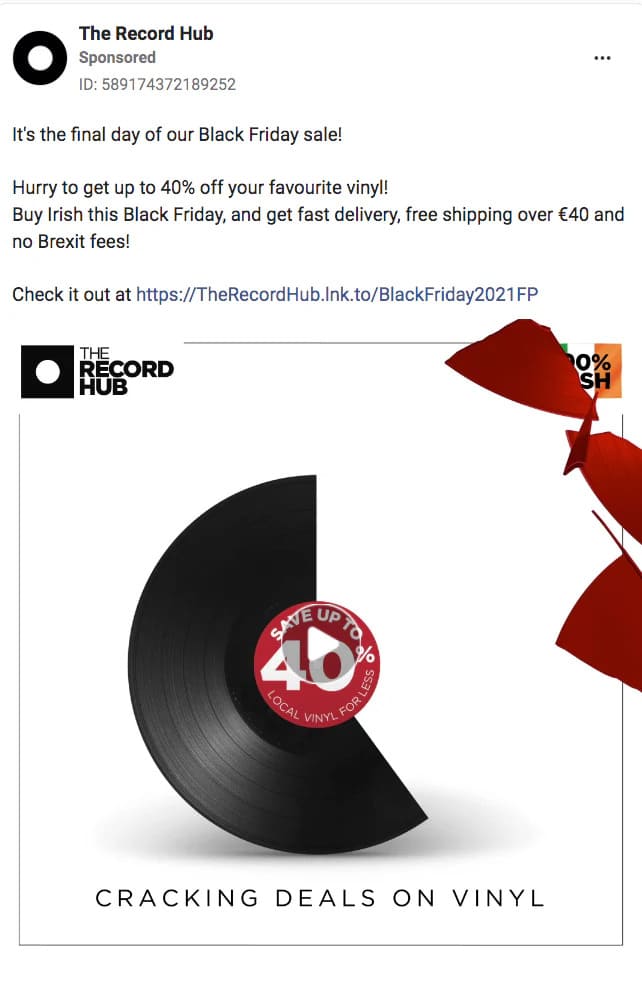
A major challenge that eCommerce brands face is to keep ad spends in control and ensure ads bring returns. That’s because ads targeted at a wide customer segment often go to waste unless it get seen by the right audience. For instance, an ad promoting children’s books may not be relevant to a senior audience or those who do not have children.
This is another reason why event firing can help to optimize ad spend. When you send relevant ads to its relevant audience, you can ensure better ad performance, lower wastage, and more focus on high-performing customer segments.
71% of customers expect a tailored experience and 76% of customers feel frustrated when brands do not personalize their experience. Personalization involves understanding customers. That’s where event firing helps to gain insights on customers.
Let’s explain this with an example. A customer buys a coffee machine from a store during the festive sale. The brand shares this information with Facebook and creates a targeted offer on coffee mugs and accessories. This not only gets the customer to click on those Facebook ads but also piques their interest and curiosity upon discovering these products.
When customers see personalized content and ads, their experience is heightened as they feel like the brand cares about them and is helping them shop better. Some important factors that lead to personalization and improved customer experience are:
Source
How To Implement Events Firing On Facebook?
You can set up events on Facebook by following these steps:
Follow these steps to ensure accurate event tracking on your website for events firing on Facebook:
To ensure effective event firing, you must identify which events are crucial for your business and then define them. For instance, page visits, clicks, product views, checkout, add to cart, purchases, etc. should definitely be added. So how do you define key events?
To ensure correct events first without any errors, it is essential to test and debug your Facebook Pixel events. Here’s what you should do.
- Log into Facebook Business Manager
- Go to Meta Events Manager from the menu
- Click the Data Sources icon on the page
- Select the name and ID of your data, in this case - Web
- Choose Facebook Pixel and click on Connect
- Click Set Up Meta Pixel
- Name your Pixel, enter your website URL, and click Continue
- Facebook offers an event setup tool where you can add events without coding
- Go to Events Manager
- Select Pixel
- Click Open Event Setup Tool
- Enter your website URL
- Follow the prompts to configure events
- Apart from standard events, you can also set up custom events if required
- Install Facebook Pixel Helper
- Check for pixels
- Use the Facebook Testing Tool
- Debug using the events debug tool to troubleshoot issues
- You must regularly review your Pixel events
Best Practices For Events Firing
Customers perform many different actions on eCommerce websites. And how you should plan your Facebook marketing strategy will depend on your goals and objectives. For instance, is your goal to attract more customers during the festive season, more sales, or something else. This will help you ensure that the event you track aligns with your key performance indicators and marketing goals.
To avoid errors and ensure the accuracy of data that you share for creating targeted ads, you must set up Facebook Pixel correctly. For instance, if you do not enter events to track properly, you may miss out on information and end up collecting false data. Hence, install Facebook Pixel properly on all relevant pages of your website. Additionally, use the Facebook Pixel Helper tool so that events are fired correctly.
The events you set up will depend on your marketing and business goals. Hence, apart from standard events such as purchases, add to cart, visits, clicks, and checkout, you must also set up custom events that are unique and specific to your marketing goals. For instance, maybe for the festive sale you have set up some gamification features. To track the performance of these activities, you will have to set up custom events.
The entire process of event firing on Facebook is automated. Hence, it is critical to keep a track of the accuracy and effectiveness of event tracking. Therefore, you must conduct regular testing and debugging of events so that the process sends the correct information and data only. You can monitor data by using Facebook Ads Manager and analytics tools to track and verify event data.
The more detailed and actionable your website data related to events, the better the results. That’s why you must implement event parameters. These will provide more context and enhance events. For example, for events such as purchase, add to cart, and checkout, you could add parameters such as value, category, currency, etc. By giving more specific information to Facebook, you can better optimize the ads. You can also use parameters to segment data and gain deeper insights into customer behavior patterns.
The world of marketing and shopping is ever-changing. And so does customer behaviour. That is why it is essential to regularly review events and optimize them with the right measures. By analyzing data from your eCommerce website, you can gain insights into trends, customer patterns, and any other important areas. To optimize events, you must adjust the tracking settings, modify events that aren’t used, add new events, etc., based on changing marketing and business needs.
Customers are highly concerned about safety and privacy matters when they shop online. 71% of consumers do not buy from brands they cannot trust. To ensure business success, it is most important to pay attention to data privacy and compliance. The first step is to follow all the regulations related to data protection, such as GDPR and CCPA, among others. Apart from this, ensure you regularly update your privacy policies. Customers should be made aware of any changes in data collection practices, privacy policy and user consent forms.
There’s a lot that goes on in an eCommerce website. And to manage it all at once is hard. That is why it is critical to integrate other tools that help manage your website and different parts of your business. For example, you must integrate Facebook Pixel data with other analytics tools such as Google Analytics for comprehensive insights. Another essential tool is a customer relationship management (CRM) tool that can help with managing customers, segmentation, and creating targeted marketing campaigns.
Facebook also keeps upgrading and changing. For example, features related to Pixels and events may change, data and privacy regulations may change, etc. It is critical to keep updated with these changes to ensure the effectiveness of your event-firing strategies during the festive season. Moreover, you don’t want to delay your campaigns just because you haven’t updated your settings based on Facebook’s policies. Facebook updates may impact your marketing strategies and their accuracy. For instance, Facebook may update event types, advertising policies, compliance requirements, etc. Stay proactive with these updates to ensure seamless Facebook marketing.
For a successful festive time marketing campaign, it is important that all related teams are knowledgeable and aware of the campaign processes and requirements. To ensure this, regularly train and educate your teams so that you have to avoid last-minute training sessions just before the festive season campaign begins. Ensure your teams are proactive and informed about training resources, new Facebook trends and features, etc.
Get Started With Events Firing On Facebook For This Festive Season
There are many benefits of events firing on Facebook. It can help you with segmentation, personalization of campaigns, and an overall better customer experience.
However, a critical part of the festive season marketing strategy is also the checkout process. Ensure a smooth, quick, and easy checkout process so that all your events firing efforts do not go to waste.
How do you ensure a smooth checkout process? Explore GoKwik Kwik Checkout — a complete checkout solution for eCommerce stores with all the key features.
Explore GoKwik and book a demo today!


![WhatsApp Catalog: How To Sell Products on WhatsApp [A Complete Guide]](https://panel.gokwik.co/storage/app/public/images/use_kwikengage_for_a_seamless_whatsapp_catalog_setup__1772512572.jpg)