|
Feature |
Browser Version |
Desktop App |
|
Setup |
No installation needed just scan QR code to start. |
Requires specific WhatsApp Business download for PC and installation. |
|
Notifications |
Relies on browser permission and keeping the tab active. |
Native system alerts appear even when the window is minimized. |
|
Calling |
Voice and video calling features are often limited here. |
Fully supports reliable voice and video calls for business. |
|
Shortcuts |
Standard shortcuts often conflict with other browser tab functions. |
Dedicated shortcuts allow faster navigation and message management. |
|
Performance |
Tab might freeze or crash if browser memory spikes. |
More stable performance as a standalone application on PC. |
Your 2026 D2C Calendar mapped day by day - Powered by real data from India’s biggest D2C shopping network
Your 2026 D2C Calendar mapped day by day - Powered by real data from India’s biggest D2C shopping network
Your 2026 D2C Calendar mapped day by day - Powered by real data from India’s biggest D2C shopping network
Your 2026 D2C Calendar mapped day by day - Powered by real data from India’s biggest D2C shopping network
Kwik Engage
WhatsApp Business Web: How to Use It for Your Business in 2026?
 04 Feb 2026
 10 Min Read
Vardhan leads product and growth initiatives at GoKwik, driving D2C e-commerce innovations, conversion optimization, and scalable growth programs for products. An ISB alumnus based in Bengaluru, he brings expertise from Unacademy, Ola, and Mahindra in building high-impact product strategies.
Typing hundreds of customer replies on a six-inch mobile screen is highly inefficient. As your order volume grows, your support team cannot be glued to a mobile phone all day. This is where moving your operations to the big screen becomes essential.
The WhatsApp Business app transforms your computer into a command center. It allows you to manage chats, organize labels, and send quick replies with the speed of a full keyboard. It bridges the gap between a casual chat app and a professional business communication tool.
However, while the web version offers convenience, it is still just a mirror of your phone. In this guide, we will show you how to set it up, use it effectively, and eventually, how to move beyond its limitations with Kwik Engage to automate your revenue truly.
What is WhatsApp Business Web?
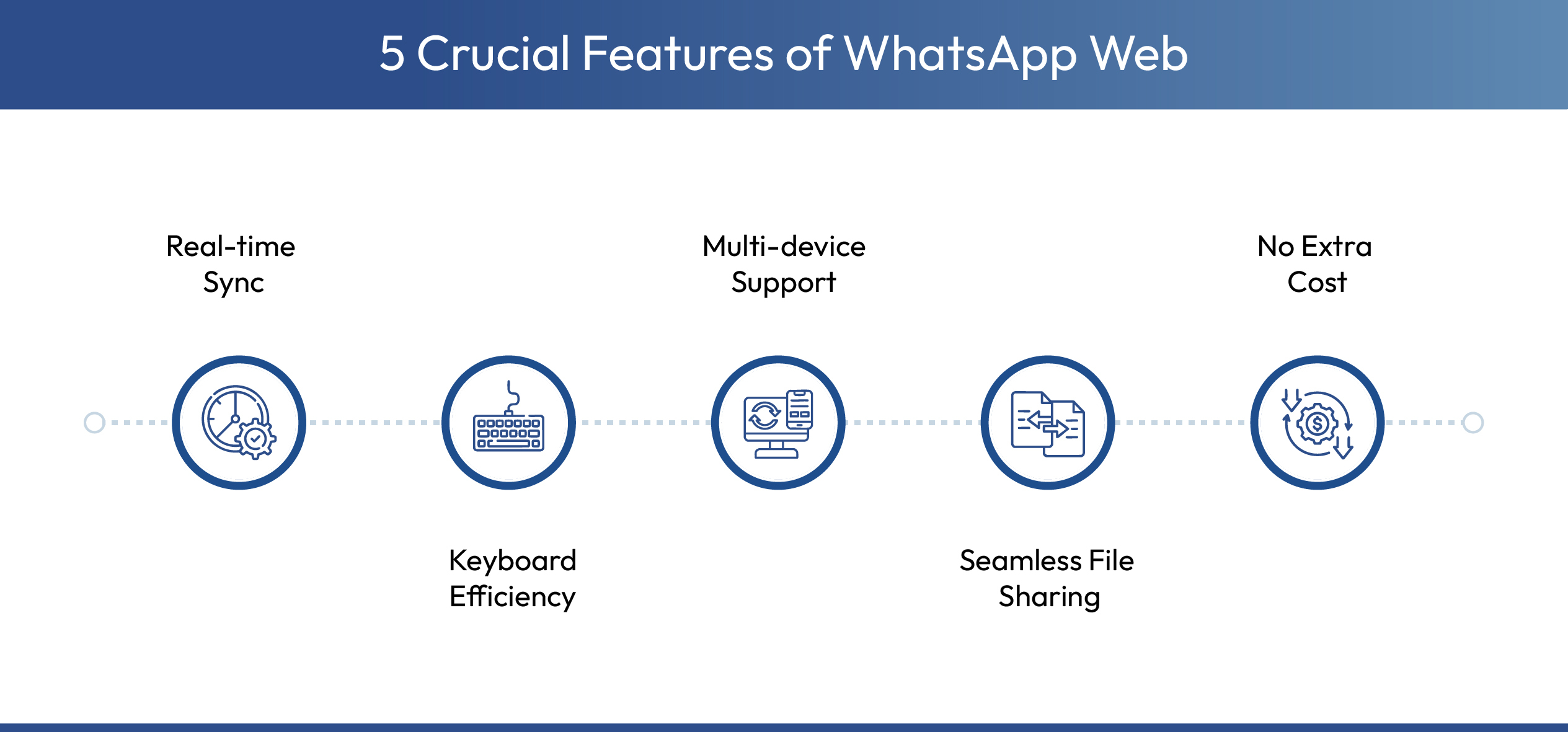
WhatsApp Web for business is a web browser extension of your business app that syncs your conversations in real-time. It provides a seamless bridge between your mobile device and your desktop workflow. Unlike a regular WhatsApp account, this version is tailored for a professional business account setup.
Let’s have a look at the key business features of this platform:
How to Set Up WhatsApp Business Web (Step-by-Step)
- Open the Browser:
Go to web.whatsapp.com on your computer. You will see a large QR code displayed on the screen.
- Open the App:
Launch the WhatsApp app on your phone. Ensure you are on the main chat screen.
- Find Linked Devices:
Tap the three dots (Android) or Settings (iOS) and select ‘Linked Devices.’
- Scan and Sync:
Point your phone at the QR code to log in. The sync happens instantly and loads your customer messages.
Browser vs. Desktop App: Which Should You Use for WhatsApp Business Web?
You can choose between the flexible browser version or the robust WhatsApp Business desktop app. While the browser offers instant access, the desktop app provides superior stability and native notifications for power users. Choosing the right interface is the next step in improving your operational efficiency.
Here is a comparative analysis of both the options:
For casual checking, the browser is sufficient. However, if your support team spends eight hours a day responding to queries, experts highly recommend the WhatsApp Business for PC application. The native app handles resources better and ensures you do not miss notifications just because a browser tab was accidentally closed.
5 Features to Master on WhatsApp Business Web
Logging into WhatsApp Web Business is only the first step. To truly optimize your workflow and response times, you must master these five built-in features designed for professional efficiency. These tools help you move from chaotic chatting to organized customer support.
- Quick Replies: Type a forward slash (/) to instantly send pre-saved answers for common queries to save significant typing effort. Instead of typing "Our store hours are 9 AM to 9 PM" fifty times a day, you simply type "/hours" and hit enter. This consistency ensures every customer gets the correct information every time.
- Labels: Use colour-coded tags like 'Pending Payment' to organize chats and track order statuses visually on your dashboard. You can quickly glance at your chat list to see who owes you money or whose order is ready to ship. This visual organization prevents orders from slipping through the cracks.
- Catalog Sharing: Access your synced inventory to send professional product cards directly to customers without leaving the chat window. You can browse your own catalog within the web interface and select items to share. This converts a simple inquiry into a shopping opportunity instantly.
- Filter Chats: Click the filter icon to view only unread messages or groups so no customer request gets missed. This is a lifesaver when your inbox is flooded during a sale. You can zero in on customers waiting for a reply rather than scrolling through completed conversations.
- File Sharing: Drag and drop invoices, photos, or documents from your desktop straight into the chat for instant sharing. This is particularly useful for B2B businesses that need to send formal quotations or purchase orders. It removes the friction of file transfer between devices completely.
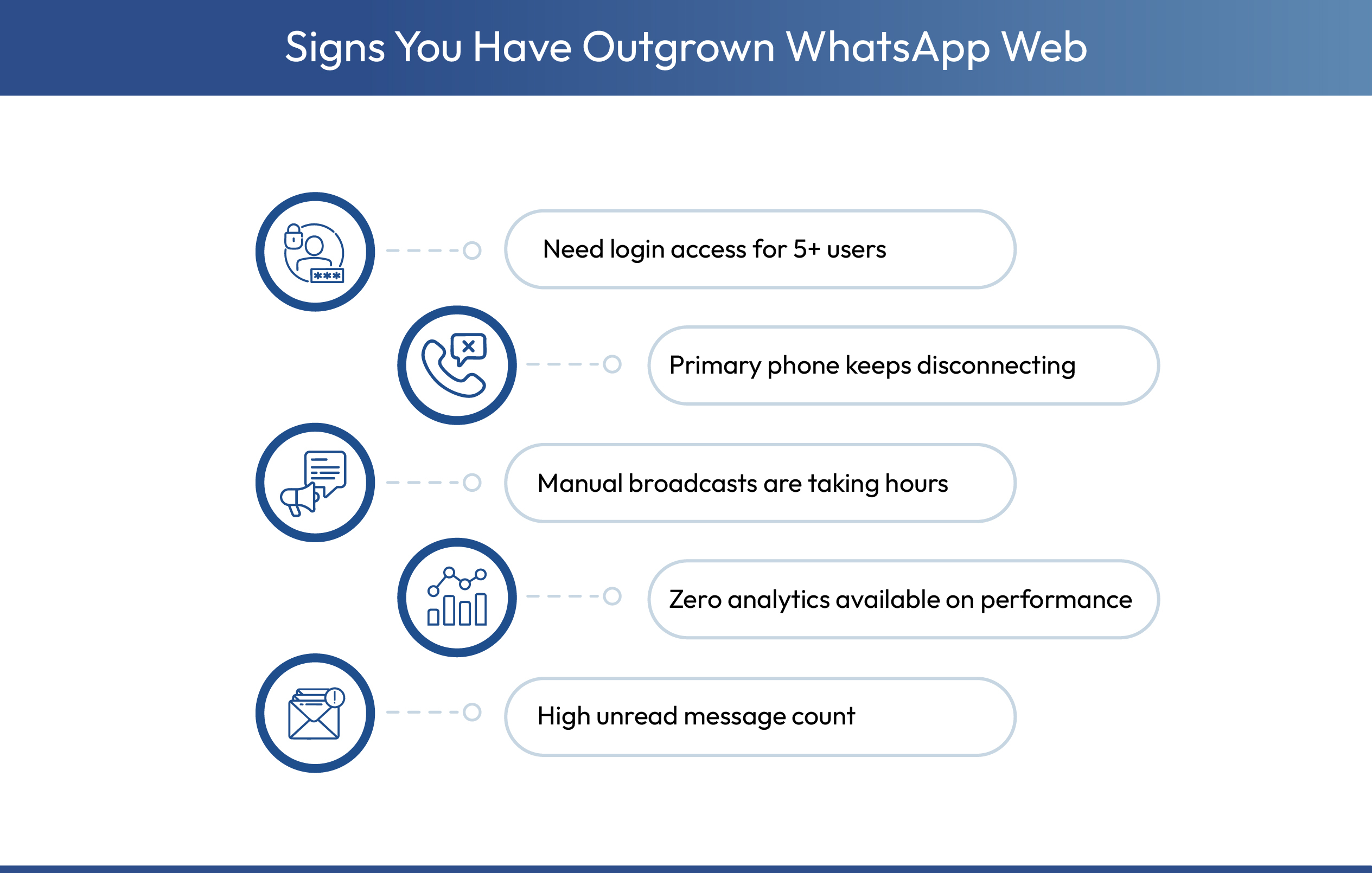
How WhatsApp Web Limits Your Productivity?
While WhatsApp Business Web is better than a phone, it is not built for scaling brands. As you grow, you will hit specific ‘ceilings’ that manual typing cannot break through. These limitations often become apparent when your daily order volume exceeds fifty.
Upgrade Your Workflow With Kwik Engage
When your team outgrows the four-device limit, you need a dedicated Revenue Engine, not another web messenger. Kwik Engage integrates with the WhatsApp API to solve the problems that WhatsApp Business for PC cannot. It transforms WhatsApp from a support channel into a sales powerhouse.

When Should You Move from Web to Kwik Engage?
Sticking to the basic web version might be fine for solopreneurs. But you should switch to Kwik Engage if you are serious about WhatsApp automation and scaling your operations. The transition point usually happens when manual effort starts costing you money.
- Tracking over 50 daily queries manually is impossible, so Kwik Engage organizes high volumes to ensure bulk messages are never buried.
- Automated flows trigger instantly to recover abandoned carts, catching distracted shoppers faster than manual follow-ups ever could.
- If you need more than four agents answering simultaneously, our API allows unlimited seats to support growing support teams.
- Protect your margins against RTO by verifying Cash on Delivery orders via WhatsApp to save thousands in logistics costs.
Final Verdict: Convenience vs. Scale
Using WhatsApp Business Web is the first logical step for any business moving away from mobile-only support. It is free, accessible, and faster than typing on glass. For a small boutique owner or consultant, this tool provides exactly the right level of efficiency without any overhead.
However, do not let the convenience of the web interface limit your growth potential. When you are ready to turn conversations into conversions at scale, Kwik Engage is your upgrade path. Stop typing manually and start automating your success today. Transitioning to an API-based solution ensures your infrastructure grows as fast as your revenue.
Book a 1:1 free consultation with our team to learn more about our platform or install the Shopify app and get started for free.
Frequently Asked Questions

AUTHOR
Vardhan Jain
Director of Product Program @ GoKwik


![WhatsApp Catalog: How To Sell Products on WhatsApp [A Complete Guide]](https://panel.gokwik.co/storage/app/public/images/use_kwikengage_for_a_seamless_whatsapp_catalog_setup__1772512572.jpg)